Compact productivity magic
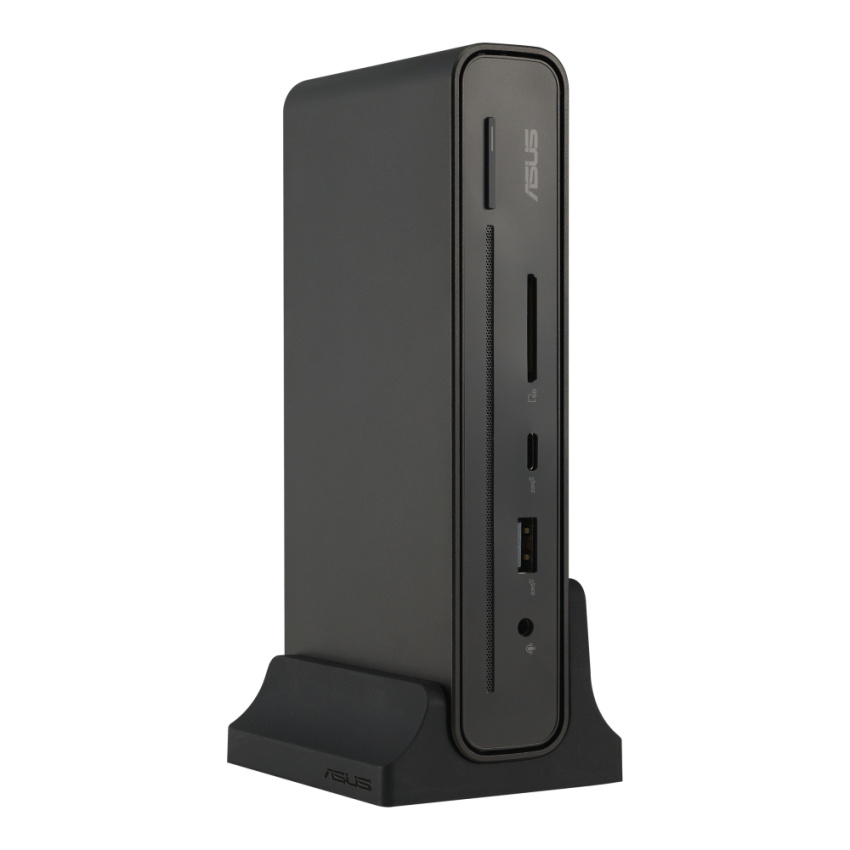
ASUS Triple Display USB-C Dock is a sleek, compact one-stop device that streamlines laptop connectivity. Power your laptop through a single cable, connect to your network and peripherals, and multitask with up to four monitors1 — including a laptop monitor and three external monitors. It also has an integrated SD card reader for a diverse array of business scenarios. Simply put, ASUS Triple Display USB-C Dock keeps your desk neat, tidy and organized while setting you up for work in the blink of an eye.
Triple-display Support
Ready for triple 4K displays
Connect up to three displays via HDMI®, DisplayPort™ and USB-C® for expanded productivity and comfortable multitasking. ASUS Triple Display USB-C Dock even supports up to three 4K2 displays for exceptional visuals.
Connectivity
Connect up to 8 devices
ASUS Triple Display USB-C Dock has a multitude of I/O ports: three external screens can be connected via HDMI®, USB-C® and DisplayPort™, two USB 3.2 Gen 1 Type-A ports support a keyboard and mouse, and there’s a USB-C® port, a USB Type-A port, an RJ45 network port, an audio jack for earphones, and a SD card reader for data transfers. That’s a total of 12 functions3.
Fast Transfers
Connect at super speeds
Enjoy 10 Gbps4 data-transfer speeds via convenient USB-C® and USB-A ports — up to 4x faster than USB 3.0 — so large files and folders can be moved or copied in moments.
High-speed Charging
Charge fast, charge in tandem
ASUS Triple Display USB-C Dock supports USB Power Delivery, providing up to 90 watts to rapidly charge almost any modern USB-C device, including the latest ultraportable notebooks. It also features a traditional USB Type-A port that delivers up to 12 watts, and a USB-C® port that delivers up to 15 watts.
Efficient Control
One-button wake-up and remote management
With ASUS Triple Display USB-C Dock, it takes just one tap to wake your laptop and all connected displays — because the dock’s power button precisely mimics that of your laptop. It also enables IT departments to remotely wake laptops that are in standby modes to apply updates and more, helping speed up routine admin and maintenance tasks5.
One-button wake up
Press the dock’s power button to wake up your laptop and multiple connected monitors during standby mode.
Remote IT management
Enable IT management to update software with Wake-on-LAN (WoL) and PXE.
Clean and Tidy
Reduce desk clutter
ASUS Triple Display USB-C Dock’s compact design and multi-modal stand empower you to reduce desktop clutter by corralling multiple cables and connections through one little package — empowering you to get to work in moments.